Showing posts with label Software. Show all posts

Sunday, January 10, 2016

IrfanView (64-bit)

http://www.majorgeeks.com/index.php?ct=files&action=file&id=10463
Download

What's new in this version:
Scan support, tablet mode, new hotkeys, small fixes

From Irfan Skiljan:
IrfanView is a fast and compact image viewer/converter. It is trying to be simple for beginners and powerful for professionals. It supports file formats and features. Features include: multi-language support, Thumbnail option, Painting, slideshow, toolbar skins, fast directory browsing, batch conversion/editing, multipage editing, file search, change color depth, scanning, cut/crop, IPTC edit, capturing, lossless JPG operations, effects, watermark image option, ICC support, EXE/SCR creating, many hotkeys, command line options and plugins.

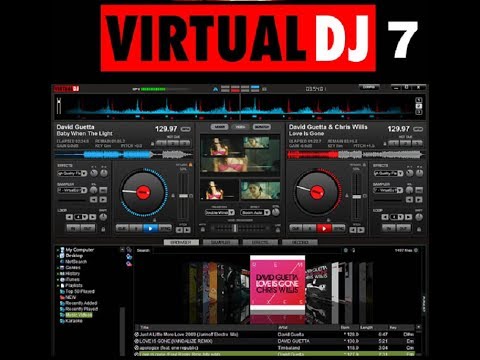
Virtual DJ 7

Publisher's Description

https://i.ytimg.com/vi/fo0DIkWAkFc/hqdefault.jpg
Download


VLC Media Player 2.2.1 (32-bit)

VLC Media Player is the most popular and robust multi format, free media player available. The open source media player was publically released in 2001 by non-profit organization VideoLAN Project. VLC Media Player quickly became very popular thanks to its versatile multi-format playback capabilities. It was aided by compatibility and codec issues which rendered competitor media players like QuickTime, Windows and Real Media Player useless to many popular video and music file formats. The easy, basic UI and huge array of customization options have enforced VLC Media Player’s position at the top of the free media players.

Watch Taking Video Snapshots With VLC Media Player
Download

Flexibility
VLC plays almost any video or music file format you can find. At its launch this was a revolution compared to the default media players most people were using that often crashed or displayed “codecs missing” error messages when trying to play media files. VLC can play MPEG, AVI, RMBV, FLV, QuickTime, WMV, MP4 and a shed load of other media file formats. For a full list of compatible file formats please click here. Not only can VLC Media Player handle loads of different formats, VLC can also playback partial or incomplete media files so you can preview downloads before they finish.
Easy to Use
VLC’s UI is definitely a case of function over beauty. The basic look does however make the player extremely easy to use. Simply drag and drop files to play or open them using files and folders then use the classic media navigation buttons to play, pause, stop, skip, edit playback speed, change the volume, brightness, etc. A huge variety of skins and customization options mean the standard appearance shouldn’t be enough to prevent you choosing VLC as your default media player.
Advanced Options
Don’t let VLC Media Player’s simple interface fool you, within the playback, audio, video, tools and view tabs are a huge variety of player options. You can play with synchronization settings including a graphic equalizer with multiple pre-sets, overlays, special effects, AtmoLight video effects, audio spatializer and customizable range compression settings. You can even add subtitles to videos by adding the SRT file to the video’s folder.
Summary
VLC Media Player is quite simply the most versatile, stable and high quality free media player available. It has rightly dominated the free media player market for over 10 years now and looks like it may for another 10 years thanks to the constant development and improvement by VideoLAN Org.
Looking for the Mac version of VLC Media Player? Download Here

Read more at http://filehippo.com/download_vlc_32/#g44dWCT9hEP5EuOJ.99

VLC Media Player 2.2.1 (64-bit)

Watch Taking Video Snapshots With VLC Media Player
Download


VLC Media Player is the most popular and robust multi format, free media player available. The open source media player was publically released in 2001 by non-profit organization VideoLAN Project. VLC Media Player quickly became very popular thanks to its versatile multi-format playback capabilities. It was aided by compatibility and codec issues which rendered competitor media players like QuickTime, Windows and Real Media Player useless to many popular video and music file formats. The easy, basic UI and huge array of customization options have enforced VLC Media Player’s position at the top of the free media players.
Flexibility
VLC plays almost any video or music file format you can find. At its launch this was a revolution compared to the default media players most people were using that often crashed or displayed “codecs missing” error messages when trying to play media files. VLC can play MPEG, AVI, RMBV, FLV, QuickTime, WMV, MP4 and a shed load of other media file formats. For a full list of compatible file formats please click here. Not only can VLC Media Player handle loads of different formats, VLC can also playback partial or incomplete media files so you can preview downloads before they finish.
Easy to Use
VLC’s UI is definitely a case of function over beauty. The basic look does however make the player extremely easy to use. Simply drag and drop files to play or open them using files and folders then use the classic media navigation buttons to play, pause, stop, skip, edit playback speed, change the volume, brightness, etc. A huge variety of skins and customization options mean the standard appearance shouldn’t be enough to prevent you choosing VLC as your default media player.
Advanced Options
Don’t let VLC Media Player’s simple interface fool you, within the playback, audio, video, tools and view tabs are a huge variety of player options. You can play with synchronization settings including a graphic equalizer with multiple pre-sets, overlays, special effects, AtmoLight video effects, audio spatializer and customizable range compression settings. You can even add subtitles to videos by adding the SRT file to the video’s folder.
Summary
VLC Media Player is quite simply the most versatile, stable and high quality free media player available. It has rightly dominated the free media player market for over 10 years now and looks like it may for another 10 years thanks to the constant development and improvement by VideoLAN Org.
VLC Media Player is now available for iOS too. Read more about it here.

Read more at http://filehippo.com/download_vlc_64/#QyW4h1oDEZt77UE5.99

BlueStacks App Player 2.0.2.5623

BlueStacks App Player is a great tool for allowing you to run your favorite mobile apps/games in full screen in your browser using a PC or Mac.
Screenshot 1
Download

BlueStacks App Player Key Features
  • Fully customizable environment
  • Support for multiple OS configurations
  • Google Play integration
Once installed, BlueStacks App Player can be configured to work with your choice of popular social media platforms i.e. Facebook or Twitter. As the environment runs Android apps, you can configure BlueStacks App Player to work with your Google Play account, so you can access all your favourtite apps and games!
The user interface of BlueStacks App Player can be totally configured to suit your needs. Additionally, it is capable of integrating with the custom software experiences which are designed and developed by PC manufacturers.
BlueStacks App Player supports multiple languages.
You can enjoy a full Android environment through BlueStacks App Player, or if you choose, you can just install Android app icons directly onto the Windows desktop.
Looking for the Mac version of BlueStacks App Player? Download Here

Read more at http://filehippo.com/download_bluestacks_app_player/#DdAjElXH8zVexRZj.99

UTorrent 3.4.6 Beta 41634

The features which are present in other BitTorrent clients are here in µTorrent, including scheduling, bandwidth prioritization, RSS auto-downloading and compatibility with BitComet-Mainline DHT. µTorrent also supports peer exchange and the Protocol Encryption joint specification (compatible with Vuze / Azureus 2.4.0.0 and above and BitComet 0.63 and above).
Unlike many other torrent clients available, µTorrent does not eat away at valuable system resources; in fact, the program typically runs on approx. 6MB of memory. µTorrent is contained within a single executable file, smaller than 1 MB.
Watch Handling And Managing A Download In UTorrent
Download

Features include:
  • BitTorrent Labs icon to the status bar
  • Help menu items for bundle and BitTorrent Labs
  • Change logging in settings to remove OpenX
  • Keyboard shortcut to refresh ads now
  • Overlay image when "i" is hovered over
  • Custom PDD
  • Teredo Tunneling / IPv6 support
  • UPnP support for all versions of Windows
  • Peer exchange
  • Protocol Encryption
The customization options for icons, toolbar graphics and status icon replacements are vast, you can even create your own. µTorrent incorporates localization support and has language support; therefore it will automatically change to your system language.
The µTorrent software was designed to use only minimal resources, yet still offering the functionality comparable to larger BitTorrent clients. µTorrent is very user-friendly; the program updates are not scheduled and are only released when thoroughly tested. This product is available for all major releases of Windows.
µTorrent provides high quality service in a tiny package.
Looking for the Mac version of uTorrent? Download Here

Read more at http://filehippo.com/download_utorrent/#XHUxAMsHUXPYrbcV.99

Saturday, January 9, 2016

Firefox 44.0 Beta 7

Mozilla Firefox is a fast, light and tidy open source web browser. At its public launch in 2004 Mozilla Firefox was the first browser to challenge Microsoft Internet Explorer’s dominance. Since then, Mozilla Firefox has consistently featured in the top 3 most popular browsers globally. The key features that have made Mozilla Firefox so popular are the simple and effective UI, browser speed and strong security capabilities. The browser is particularly popular with developers thanks to its open source development and active community of advanced users.
Easier Browsing
Mozilla put of a lot of resources into creating a simple but effective UI aimed at making browsing quicker and easier. They created the tab structure that has been adopted by most other browsers. In recent years Mozilla has also focused on maximizing browsing area by simplifying toolbar controls to just a Firefox button (which contains settings and options) and back/forward buttons. The URL box features direct Google searching as well as an auto predict/history feature called Awesome Bar. On the right side of the URL box there are bookmarking, history and refresh buttons. To the right of the URL box is a search box which allows you to customize your search engine options. Outside of that a view button controls what you see below the URL. Next to that you have the download history and home buttons.
Speed
Mozilla Firefox boasts impressive page load speeds thanks to the excellent JagerMonkey JavaScript engine. Start up speed and graphics rendering are also among the quickest in the market. Firefox manages complex video and web content using layer-based Direct2D and Driect3D graphics systems. Crash protection ensures only the plugin causing the issue stops working, not the rest of the content being browsed. Reloading the page restarts any affected plugins. The tab system and Awesome Bar have been streamlined to launch/get results very quickly too.
Watch Managing Browser Add-Ons In Mozilla Firefox
Download


Security
Firefox was the first browser to introduce a private browsing feature which allows you to use the internet more anonymously and securely. History, searches, passwords, downloads, cookies and cached content are all removed on shutdown. Minimizing the chances of another user stealing your identity or finding confidential information. Content security, anti-phishing technology and antivirus/antimalware integration ensures your browsing experience is as safe as possible.
Personalisation & Development
One of the best features of the Firefox UI is customization. Simply right click on the navigation toolbar to customize individual components or just drag and drop items you want to move around. The inbuilt Firefox Add-ons Manager allows you to discover and install add-ons within the browser as well as view ratings, recommendations and descriptions. Read about the top recommended add-ons for Mozilla Firefox on TechBeat. Thousands of customizable themes allow you to customize the look and feel of your browser. Site authors and developers can create advanced content and applications using Mozilla’s open source platform and enhanced API.
Looking for the Mac version of Firefox? Download Here

Read more at http://filehippo.com/download_firefox/#dQ5OE7d7qWrvi6Ky.99

Adobe Reader 11.0.10

Adobe Reader is the most popular program in the world for viewing, creating, managing and manipulating PDF (Portable Document Format) files. It is the standard that all other PDF readers are judged against. Publically released in 1993, Adobe Reader was originally priced at $50 per user before Adobe separated its product range to offer Adobe Reader freeware and their professional Adobe Acrobat versions. PDF became the file format of choice for businesses thanks to its cross platform flexibility and security capabilities.

Download Link
Download

Simple UI
Adobe Reader’s UI is simple and intuitive. Classic tools (text selection, zoom, snapshots, find, etc.) can be accessed from the top navigation menu and buttons. The latest version also includes advanced Tools (create, export, send and store options), Sign and Comment features. You can share iterations, comments and signatures by email or using the Adobe SendNow service.
Security
Adobe Reader XI is the safest version Adobe have released. This is mainly due the new Protected Mode which loads potentially hazardous items and code in a sandboxed area, isolated from the rest of your system.
Speed
There have been some criticisms over Adobe Reader’s speed compared to other lightweight PDF readers. It’s true; Adobe Reader does have more plugins and extensions than most PDF readers which can slow operation. That being said the difference for the average user is negligible and those add-ons can be disabled if they are not required. In terms of general operation, Adobe Reader renders documents with high detail and true colour reproduction quickly. Later editions have also had work done to improve Adobe Reader’s impact on memory usage so you should find multitasking takes less strain on your system.
Looking for the Mac version of Adobe Reader? Download Here

Read more at http://filehippo.com/download_adobe_reader/#W8kCq6bmqDGSigcY.99